
How to Submit URLs to Bing with IndexNow (Free)
Make an IndexNow key, upload its file to your site, and submit up to 1,000 URLs to Bing, Yandex, Seznam, Naver and other engines in one batch for free.
To submit URLs with IndexNow, open the IndexNow URL Submitter, press Make a key, upload the key file to the top folder of your site, then list your URLs and press Submit. The tool checks the key file and sends one batch to IndexNow, which shares it with Bing, Yandex, Seznam, Naver and other engines.
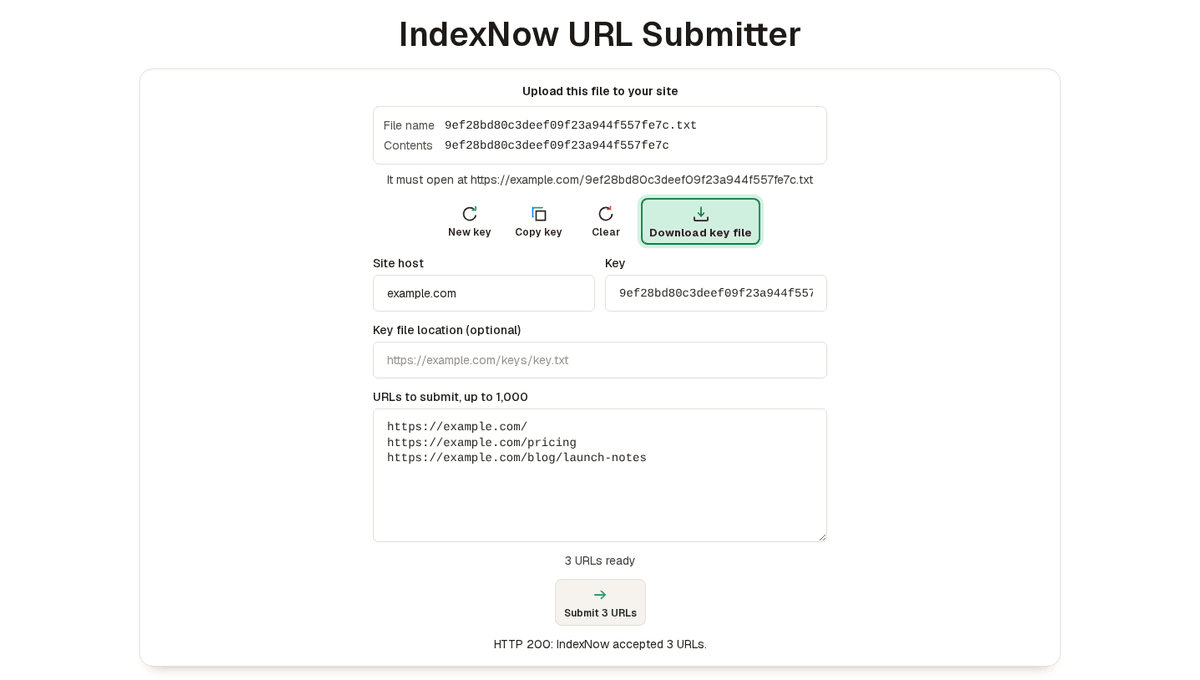
Steps
- Make a key. Open IndexNow Submitter and press Make a key. If your site already has a key, type it in Key instead.
- Upload the key file. Press Download key file and put the file in the top folder of your site, so it opens at the address shown, such as
https://example.com/your-key.txt. - Type the host. Enter your site's host, such as
example.com. If the key file lives elsewhere on the same host, fill in Key file location. - List the URLs. Paste up to 1,000 URLs on that host, one per line. The counter shows how many URLs are ready and how many were left out, and why: repeated, off this host, not web addresses, or over the limit.
- Press Submit. The result line shows IndexNow's HTTP answer.
What the results mean
- HTTP 200 means IndexNow accepted the URLs.
- HTTP 202 means IndexNow received them and is still checking your key. Keep the key file in place.
- HTTP 403 means the key is not valid for this host. Check that the file opens and holds only the key.
- HTTP 422 means a URL is not on the host, or the key does not fit it.
- HTTP 429 means too many requests. Wait before sending more.
- A message about the key file means the tool could not read it, so nothing was sent to IndexNow.
Questions
Does IndexNow work with Google? No. Google does not take part in IndexNow. To see how Google treats a page, use the Google index checker.
Does a submission mean the page will be indexed? No. It tells the engines a URL is new or changed so they can crawl it sooner. Whether it is indexed is still their decision.
Do I need a new key each time? No. Keep the same key file on your site and reuse the key for later submissions.
Related tools and guides
- Website SEO audit: fix broken links before you submit.
- Search report: see Bing clicks and impressions after the crawl.
- Meta tag checker: check a page's tags before you submit it.
How to Check Page Speed and Core Web Vitals
Test any page with Google Lighthouse on mobile or desktop, and see Core Web Vitals from real Chrome users, lab metrics, and fixes that save the most time.
How to Check DNS Records for a Domain (Free)
Look up A, AAAA, CNAME, MX, TXT, NS, SOA and CAA records for any domain, and check SPF, DMARC and DKIM with a clear fix for each problem found.