
How to Check a Domain's Age and Expiry Date
Find when a domain was registered, when it expires, its registrar and nameservers, read from the registry's public RDAP record in your browser.
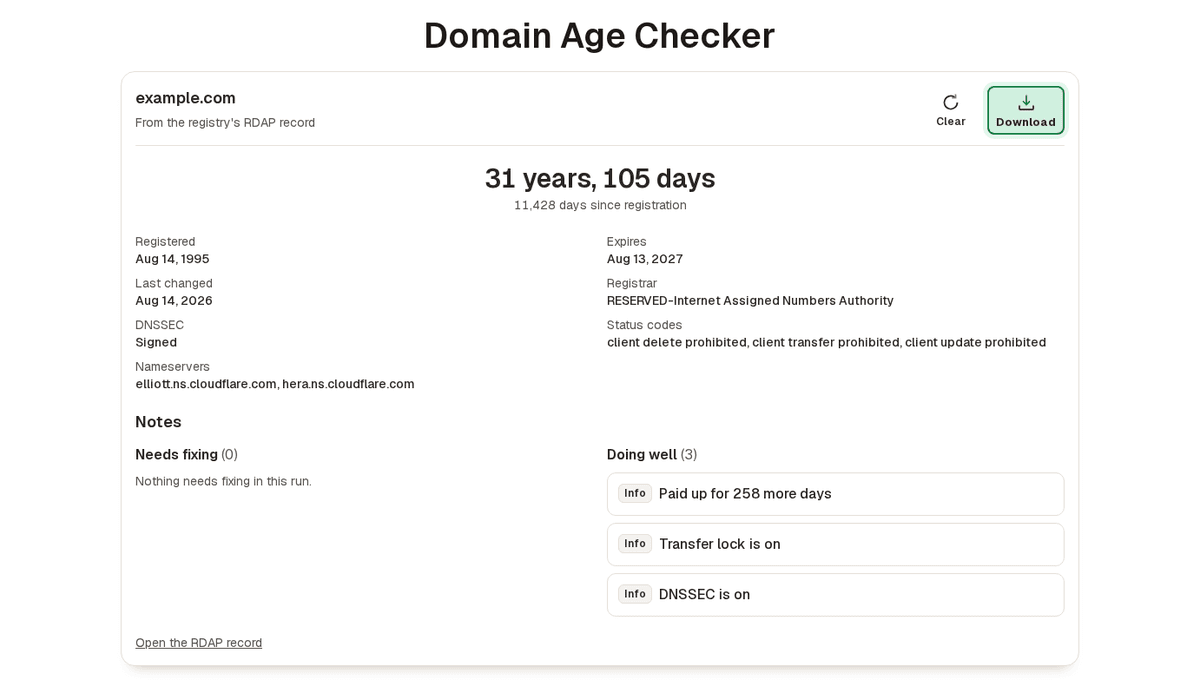
To check how old a domain is, open the Domain Age Checker, type the domain, and press Check age. Your browser reads the registry's public RDAP record and shows the age in years and days, the registration and expiry dates, the registrar, status codes, nameservers and DNSSEC.
Steps
- Open the tool. Go to Domain Age Checker.
- Type the domain. Enter a name such as
example.com. A full URL also works; only the domain is used. - Press Check age. IANA's list tells your browser which registry to ask, and the registry answers.
- Read the notes. Needs fixing warns about an expired domain, an expiry within 60 days, a transfer lock that is off, or DNSSEC that is off.
- Save or open the source. Press Download for a CSV, or Open the RDAP record to see the registry's own answer.
What the results mean
- Age counts from the registration date in the registry record. It is the age of the current registration, which restarts if a domain lapsed and was registered again.
- Expires is the date the registration ends unless it is renewed.
- Last changed is the last update to the registry record, such as a renewal or a nameserver change.
- Status codes such as client transfer prohibited show the locks set at the registrar.
- DNSSEC: Signed means DNS answers for the domain can be verified.
Questions
What is RDAP? The Registration Data Access Protocol is the structured replacement for WHOIS. Registries publish it so anyone can read a domain's dates and registrar.
Why does a country domain show no dates? Some country registries have no public RDAP service, or serve it only over plain HTTP. The tool says so. When there is no service, it links to the registry's page at IANA. When the service is plain HTTP only, it links to the RDAP record so you can open it in a new tab.
Is the domain age the same as the website's age? Not always. To see when a site first appeared, check its captures in Website History.
Related tools and guides
- Website history: first and latest Wayback Machine captures.
- DNS lookup: the records the domain serves now.
- Backlink audit: who links to your domain.
How to Check DNS Records for a Domain (Free)
Look up A, AAAA, CNAME, MX, TXT, NS, SOA and CAA records for any domain, and check SPF, DMARC and DKIM with a clear fix for each problem found.
How to See Old Versions of a Website (Wayback)
Look up a website's Wayback Machine captures: the first and latest capture, months archived per year, and a link to each month's archived copy.