
How to resize a PDF: shrink the file or change the page size
Two different jobs share one name. Learn when to compress a PDF to cut its MB, when to change its page size, and how to check the result.
Published November 27, 2026 · 7 min read
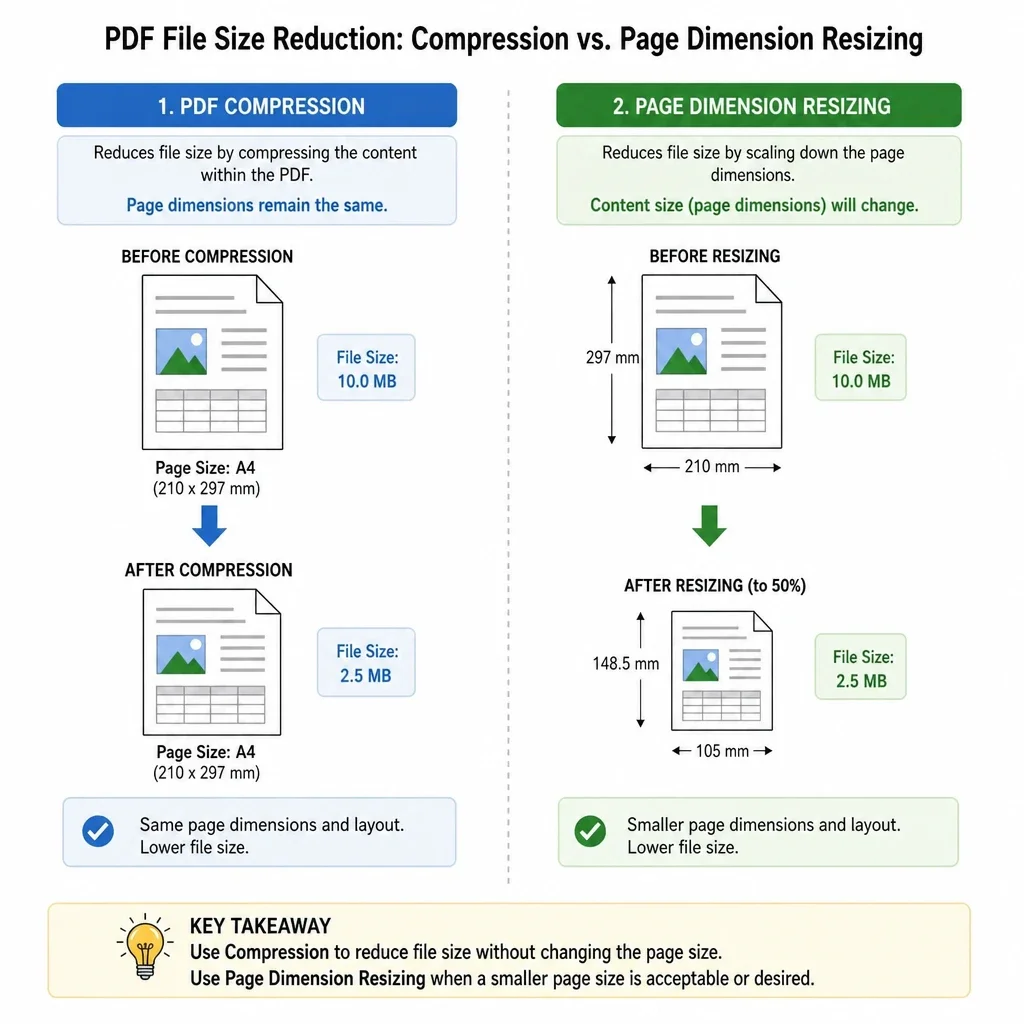
"Resize a PDF" can mean two different jobs: making the file smaller so it fits an upload or email limit, or changing the pages to a different paper size such as A4 or Letter. The diagram above shows the difference. Compression keeps every page the same size and shrinks the data inside; page resizing changes the page itself. This guide helps you pick the right one, do it in a couple of minutes with free tools like Compress PDF and Resize PDF, and check the result before you send it. (helpx.adobe.com)
What does resizing a PDF actually mean?
Compression reduces how much storage a document uses. Page resizing changes its physical dimensions or printed scale. Before you start การ resize pdf, decide whether you need a smaller digital file, a different paper format, or both, because compression settings and page-size controls solve different problems. (helpx.adobe.com)
Start from the requirement you were given:
- An upload or email limit (for example "max 2 MB" or "under 200 KB"): you need to reduce the file size, or ลดขนาด pdf. Use Compress PDF and check the result against the limit.
- A paper-size requirement (for example "A4 only"): you need to change the page dimensions. Use Resize PDF, which refits every page to A4, Letter, Legal, A3 or A5.
- Both: treat them as two separate steps. Resize the pages first, then compress, and check both before you deliver.
Write the target down before you change anything. "Under 200 KB" and "A4 pages" are clearer goals than "make it smaller".
| What you need | Tool to use | What changes |
|---|---|---|
| Fit an upload or email limit | Compress PDF | File size in KB or MB |
| Hit an exact limit like 200 KB | Compress PDF to 200 KB | File size, aimed at the target |
| Print or submit on A4 or Letter | Resize PDF | Page dimensions |
| A file too big to send in one piece | Split PDF | Number of files |
How to compress a PDF step by step
To compress a PDF, keep the original, compress a copy, then compare the new file's size and readability with the original. That gives you a fallback if stronger PDF compression makes images or small text hard to read. (helpx.adobe.com)
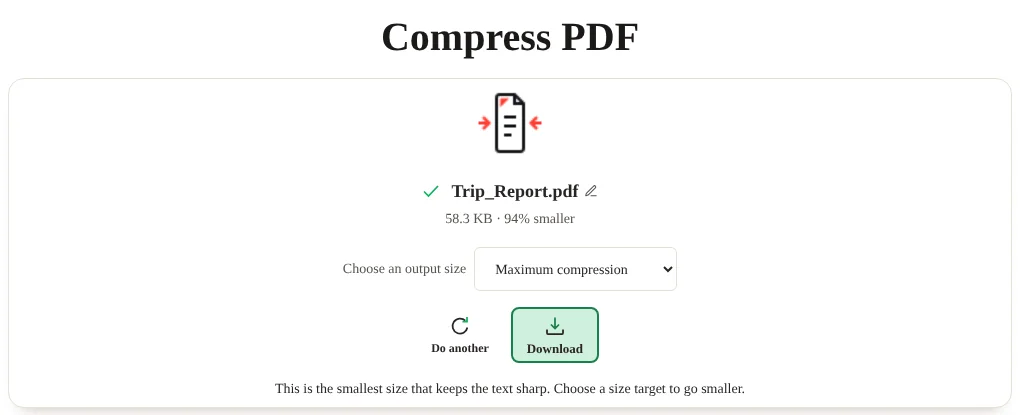 A 1 MB report with photos came out at 58.3 KB, 94% smaller, with the text still sharp.
For a quick บีบไฟล์ pdf workflow with Free-Utils Compress PDF:
- Check the requirement. Note the upload limit and whether the document is for reading on screen, printing, or further editing.
- Keep an untouched original. The tool saves a new copy, so your original stays as it was.
- Open the PDF. Choose the file on your phone or computer. It is processed in your browser, so the file stays on your device.
- Read the result. The tool compresses straight away to the smallest size that keeps the text sharp and shows the new size and how much smaller it is.
- Go smaller only if you need to. Select Change size and choose an output size such as 200 or 100 KB. Pick the largest size that still meets your limit.
- Download and reopen the copy. Check a few representative pages before you send it.
Good test pages are the smallest footnote, the busiest chart, and a page with a photo, not just the cover. If the result meets your requirement, keep it instead of chasing an even smaller file. If compression would make the file bigger, the tool keeps your original, so you never end up with a worse copy by accident. The compress a PDF guide walks through every screen.
Other ways to compress a PDF
- Adobe Acrobat: the desktop app has a Compress a PDF tool, and Acrobat on the web offers selectable compression levels. Adobe says the web version saves the result to Adobe cloud storage, so consider that before uploading a sensitive document. (helpx.adobe.com)
- Preview on a Mac: open the PDF, choose File > Export, and pick Reduce File Size from the Quartz Filter menu. Save under a new name to keep the original. Apple notes that quality and size can vary, so check the exported copy. (support.apple.com)
For confidential files, check your organization's rules before uploading documents to any third-party service, and prefer a tool that processes files on your device.
Can PDF compression keep the quality?
Compression can keep acceptable visual quality, but it cannot promise a much smaller file with no trade-offs. Some settings lower image resolution or permanently discard image data; others remove document features. The right choice depends on what the file contains and what you need to keep. (helpx.adobe.com)
When you บีบอัดไฟล์ pdf, treat the settings as decisions rather than assuming smaller is always better:
- Image resolution: downsampling removes image detail. Check scanned text, diagrams, and photos before accepting the result.
- Image compression: photos and flat-color illustrations compress differently. One setting rarely suits every page.
- Document elements: heavy optimization can remove comments, forms, or other data. Keep anything the recipient still needs. (helpx.adobe.com)
For a document read on screen, test readability at the size your reader will use. For a document that will be printed, print a sample page first. A readable reference copy and a presentation-quality brochure do not need the same compromise.
How to change the page size of a PDF
If your goal is ปรับขนาด pdf for paper, change the page size instead of compressing. Free-Utils Resize PDF refits every page to A4, Letter, Legal, A3 or A5 in your browser. Each page is scaled to fit and centered, so nothing is cut off; if the shapes differ you get a thin white margin on two sides. Sideways pages stay sideways, so a wide table is not squeezed onto an upright sheet.
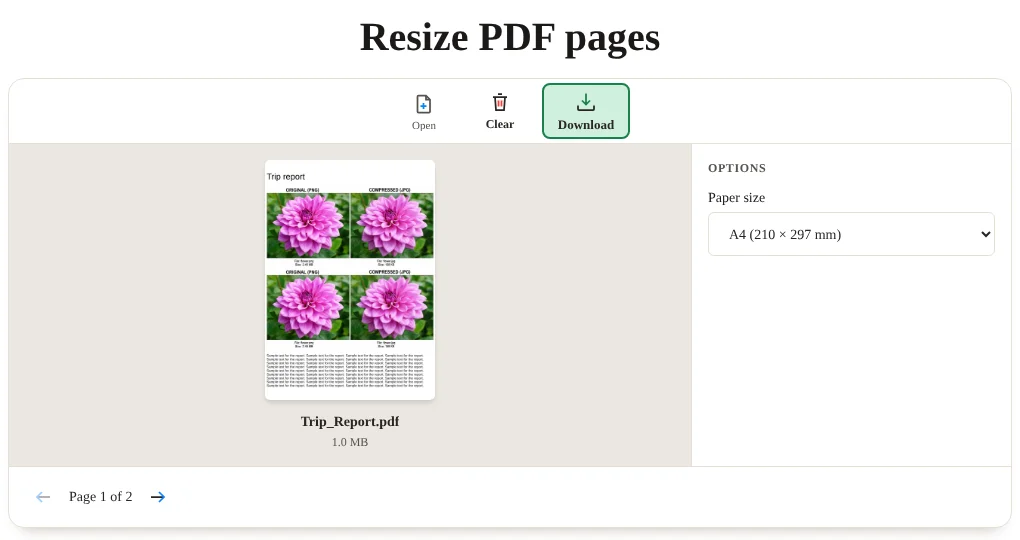 Free-Utils Resize PDF changes every page to A4, Letter, Legal, A3 or A5 without cutting content.
Changing the page size on its own does not reliably make the file smaller. In the diagram at the top, the 2.5 MB result comes from the content being scaled down along with the page. Free-Utils Resize PDF keeps your content intact, so the file stays about the same size in KB or MB. If you also need a smaller file, compress it after resizing.
If you only need a correct printout rather than a new file, your print dialog can scale instead. In Acrobat, Fit enlarges or reduces each page to the printable area, Shrink oversized pages reduces large pages without enlarging small ones, and Actual size prints without scaling, which can crop content that does not fit. Check the preview, especially labels, page numbers, and wide tables. (helpx.adobe.com)
If someone asks for a resized digital PDF, ask for the exact page size, and open the saved file to confirm it before sending. A good printout does not prove the file itself meets the requirement.
What to do when a PDF is still too large
If your first อัดไฟล์ pdf attempt misses the target, find out what takes up the space before you push the settings harder. In most PDFs, scanned pages and photos are the biggest part. Acrobat's Audit space usage report shows how much images, fonts, forms, and comments each contribute. (helpx.adobe.com)
- Try a smaller target. For a fixed limit, Compress PDF to 100 KB or to 200 KB aims straight at it and tells you if the file cannot get there.
- Split it. If the recipient accepts several files, Split PDF can cut it into parts that each stay under a size you choose. Our comparison of PDF split and merge tools covers other splitters, including offline ones.
- Remove pages you do not need in the PDF editor, then compress again.
- Shrink photos before you build the PDF. If you are making a PDF from pictures, compress the images first, then use Photo to PDF. See how to add pictures to a PDF for the full workflow.
If you still cannot meet the limit at acceptable quality, ask the recipient whether a split document or another delivery method is fine. Confirm before you delete pages or send only part of the file; a smaller attachment is no use if it leaves out something they need.
Check the finished PDF before you share it
Checking is part of resizing, not an optional last glance. Open the actual file you plan to send and run through this list:
- File size: confirm the saved file meets the upload or attachment limit.
- Every page is there: compare the page count and order with the original.
- Details are readable: check small text, chart labels, tables, and any scanned handwriting.
- Features still work: test links, bookmarks, selectable text, or form fields the recipient needs.
- Layout is right: check orientation, margins, and page size against the requested format.
- It is the right file: use a clear filename and attach the checked copy, not an earlier export.
If anything fails, go back to the original and change one setting at a time so you can see which change caused the problem. Keep the original until the recipient has accepted the file.
Keep the smallest useful version
Start with a clear requirement, use the tool that matches it, and judge the result by whether it works, not by file size alone. Keep the original, check the finished copy, and stop once the PDF meets the destination's rules.
Try it free: Compress a PDF or resize PDF pages to A4. Both run in your browser, so your file never leaves your device.
สรุปภาษาไทย: วิธีการ Resize PDF อย่างง่าย
การ resize pdf มีสองแบบ แบบแรกคือ ลดขนาด pdf ให้ไฟล์เล็กลงเพื่ออัปโหลดหรือส่งอีเมล ใช้ บีบอัด PDF หรือ บีบอัด PDF ให้ต่ำกว่า 2 MB ซึ่งทำงานในเบราว์เซอร์ ไฟล์ไม่ถูกอัปโหลด แบบที่สองคือ ปรับขนาด pdf ให้หน้าเป็น A4 หรือ Letter สำหรับพิมพ์ ใช้ Resize PDF ซึ่งไม่ทำให้ขนาดไฟล์เล็กลง หลังบีบไฟล์ pdf หรืออัดไฟล์ pdf แล้ว ให้เปิดไฟล์ตรวจทุกหน้า ตัวอักษรเล็ก และขนาดไฟล์ก่อนส่งเสมอ และเก็บไฟล์ต้นฉบับไว้
How would you rate this content?