
Online video tools
Cut the slow start off a clip, shrink a video so it fits in WhatsApp or an email, turn an iPhone MOV into MP4 or record your screen. These video tools do the encoding on your own device, so the clip is never uploaded to us.
- Runs in your browser
- Free, no account to download
- Works on phone and computer
All 35 video tools, grouped by task
Edit and record video
Trim, crop, resize, rotate, speed up, mute or loop a clip, add music, text, a logo or subtitles, and record your screen or webcam.
- Compress videoMake a video smaller for email, WhatsApp or upload limits.
- Trim videoCut a video down to the part between a start and an end time.
- Loop videoPlay a clip several times in a row and save it as one MP4.
- Merge videosJoin several clips end to end into one MP4.
- Change video speedSpeed a video up or slow it down and save an MP4.
- Add music to videoPut a song or voice-over on a video and save an MP4.
- Crop videoDrag the frame or pick a shape to cut the edges off a video.
- Resize videoRefit a video to 9:16, a square, 4:5 or 16:9.
- Rotate videoTurn a sideways or upside-down video the right way up.
- Flip videoMirror a video left to right, so text in a selfie video reads correctly.
- Mute videoRemove the sound from a video and save a silent copy.
- Add text to videoWrite a line of text on every frame of a video.
- Add logo to videoPut your logo or any picture on every frame of a video.
- Add subtitles to videoBurn the subtitles from an SRT or VTT file into a video.
- Screen recorderRecord your screen, a window or a browser tab without installing anything.
- Webcam recorderRecord a video with your camera and microphone in the browser.


Convert video format
Turn MOV, MKV, AVI, WebM, 3GP and other files into MP4, or make a GIF from a clip and a clip from a GIF.
- Convert videoTurn a video into MP4, WebM, MOV, AVI, MKV, GIF or MP3.
- Video to MP4Save a video as an MP4 you can open on a phone, a TV, or a laptop.
- MOV to MP4Turn an iPhone or QuickTime MOV into an MP4 that plays everywhere.
- Video to MOVTurn a video into a MOV that QuickTime and other editors can open.
- Video to WebMSave a video as WebM when you want a file the browser can play.
- Video to AVISave a video as an AVI for an older player or editor.
- Video to MKVSave a video as an MKV file.
- 3GP to MP4Turn a 3GP video from an older phone into an MP4 that plays everywhere.
- DAT to MP4Turn the .dat video files on a Video CD into MP4 files you can keep and share.
- VOB to MP4Turn the .vob video files on a DVD into MP4 files that play on a phone or TV.
- MKV to MP4Turn an MKV from a media server or OBS into an MP4 that phones and social apps can play.
- HEVC to MP4Put an HEVC/H.265 video from a MOV or raw file into an MP4 that more apps accept.
- AVI to MP4Turn an older AVI camera or Windows video into an MP4 for phones and modern TVs.
- WebM to MP4Turn a WebM screen recording or browser video into an MP4 for social media and phones.
- iPhone Video to MP4Turn an iPhone MOV (including HEVC) into an MP4 that Android, Windows and social apps can play.
- Video to GIFTurn a short video into a GIF you can drop into a chat or a document.
- MP4 to GIFTurn a short MP4 clip into a GIF for a chat or a document.
- GIF to MP4Turn a GIF into a small MP4 that is easier to send.
- GIF to APNGTurn a GIF into an animated PNG with smoother colours and see-through edges.


See the video tools at work
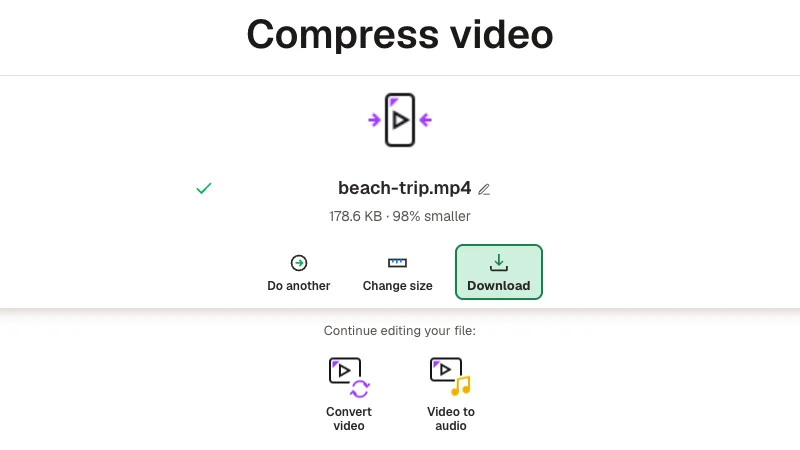
A video 98% smaller
An 8.7 MB, 12-second clip came out at 178.6 KB on the first pass, ready to send. Change size offers 500 KB down to 100 KB targets.
Open Compress video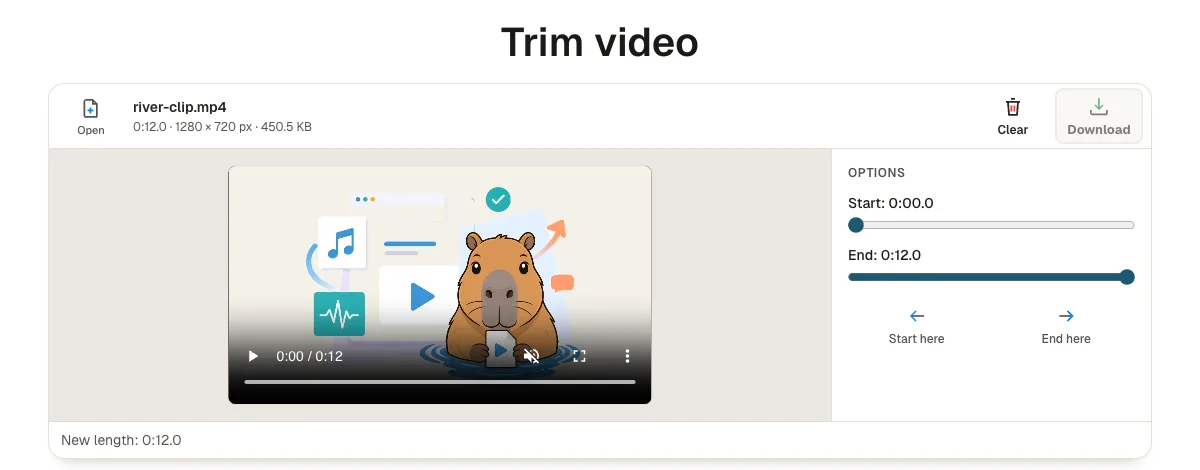
Pick a start and an end
Trim video plays the clip next to two sliders. Set where it starts and ends, check the new length, then download the cut.
Open Trim video
How the video tools work
Choose a clip
Open an MP4, MOV, WebM or MKV from your phone or computer, or record one with the screen or webcam recorder.
Set the edit
Drag the start and end, pick a frame shape, a speed or a target size. Play the preview to check it before you save.
Save an MP4
The tool encodes the new video in your browser and saves it. A longer clip takes longer, and the page shows its progress.
When the video tools help
Sending a clip in chat or email
Phone videos are often too big to attach. Compress video brings them down to a size an email or chat app accepts, and Trim video drops the parts nobody needs.
Posting to Reels, Shorts and TikTok
Resize to 9:16, crop out the edges, add captions or music, and loop a short clip so it plays longer.
Making a how-to or a bug report
Record your screen or webcam, cut it to the useful part and turn it into a GIF that plays anywhere.
Old or odd formats
Convert DAT, VOB, 3GP, AVI and HEVC files from old cameras and DVDs into MP4, which every phone and TV can play.
Questions people ask
Is there a file size limit?
Free processing on your device handles videos up to 300 MB on a computer and 150 MB on a phone. For a bigger file some tools offer optional server processing, which uploads the video only if you choose it.
Why does a long video take a while?
The encoding runs on your own processor instead of a server. A computer is faster than a phone, and keeping the tab open in front helps.
What format will my video be saved in?
Most tools save an MP4, which plays on phones, TVs and social sites. The converters can also save MOV, WebM, AVI, MKV or GIF.
Is there a watermark on the result?
No. The saved video has no watermark and no logo unless you add one yourself with Add logo to video.
Can I get just the sound from a video?
Yes. Video to audio and MP4 to MP3 keep the soundtrack and drop the picture, which gives a far smaller file. They are listed with the audio tools.
Do I need to install anything?
No. The tools run in an up-to-date browser such as Chrome, Edge or Safari on a computer or phone, with nothing to install and no account needed to download.