
Online PDF tools
Fill in a form, sign a contract, join scanned pages, shrink a file for an upload limit or turn a PDF into Word. Every PDF tool on Free-Utils is listed here, grouped by the job it does, and each one opens straight in your browser.
- Runs in your browser
- Free, no account to download
- Works on phone and computer
All 70 PDF tools, grouped by task
Organize pages
Join several PDFs into one, split a long file apart, or delete, rotate and reorder pages before you send it.
- Merge PDFCombine PDF files into one document, in the order you choose.
- Split PDFPull out one page, or split a whole PDF into separate files.
- Organize PDFReorder, rotate and remove PDF pages using thumbnails, then save a new PDF.
- Remove pagesPick the pages to delete from their thumbnails and save the rest as a new PDF.
- Extract pagesPick the pages you want and save them as a new PDF.
- Rotate PDFTurn sideways or upside-down PDF pages the right way up and save the result.
- Crop PDFTrim the margins or edges off PDF pages and save a tighter copy.


Edit, compress, sign and secure
Shrink a PDF to a size limit, type on it, fill in and sign forms, add watermarks and page numbers, black out private details, and lock or unlock the file.
- PDF EditorEdit, sign, fill, split, merge and rearrange a PDF in one place.
- Compress PDFFree online PDF compressor to reduce PDF size for email and upload limits.
- Compress PDF to 100 KBShrink a PDF to under 100 KB for an upload form.
- Compress PDF to 200 KBShrink a PDF to under 200 KB for an upload form.
- Compress PDF to 300 KBGet a PDF below 300 KB for a portal upload.
- Compress PDF to 500 KBShrink a PDF to under 500 KB for a document upload.
- Compress PDF to 1 MBShrink a long PDF to under 1 MB for email or an upload form.
- Compress PDF to 2 MBPick a PDF and get a copy under 2 MB, with no settings to choose.
- Compress PDF to 5 MBBring a heavy PDF under 5 MB with as little loss as possible.
- Unlock PDFRemove the password from a PDF you can already open.
- Protect PDFAdd a password so only people who know it can open the PDF.
- Add watermarkStamp a text watermark on every page.
- Add page numbersNumber every page and choose where the numbers sit.
- Fill PDF formType into a PDF form and save a completed copy, without printing it.
- Annotate PDFHighlight parts of a page or draw on it, then save a marked copy.
- Straighten PDFFix scanned pages that sit at a slant.
- PDF bookmarksAdd, rename or remove the bookmarks that let readers jump to a page.
- Add header and footerWrite a line at the top and bottom of every page, with page numbers if you want them.
- Bates numberingStamp a running number such as ABC000001 on every page of a PDF.
- Grayscale PDFTurn every page of a colour PDF into black and white.
- Create fillable PDFAdd text boxes, checkboxes and dropdowns to a PDF so others can fill it in.
- Flatten PDFTurn a filled PDF form into a normal PDF whose answers cannot be edited.
- Resize PDF pagesChange every page of a PDF to A4, Letter, Legal, A3 or A5.
- PDF pages per sheetPut 2, 4, 6 or 9 pages on each A4 sheet to save paper.
- Edit PDF metadataSee and change the title, author, subject and keywords stored in a PDF, or remove them.
- PDF to textPull the text out of a PDF, scanned pages included, then copy it or save it as TXT.
- Sign PDFType, draw or upload your signature and drag it onto the page.
- Redact PDFBlack out private text and remove it from the file for good.
- Compare PDFSee what changed between two versions of a document.
- Repair PDFPick a PDF that will not open and get a rebuilt copy.


Make a PDF
Turn photos, scans, Word, Excel, PowerPoint, web pages and text into a PDF that looks the same on every screen.
- Convert to PDFConvert photos and images into one PDF.
- JPG to PDFConvert JPG and JPEG photos into one PDF for forms, email, or WhatsApp.
- JPG to PDF under 100 KBMake a PDF from your photos that stays under 100 KB, ready for a strict upload field.
- JPG to PDF under 200 KBJoin a few document photos into one PDF that fits a 200 KB limit.
- JPG to PDF under 300 KBTurn a short set of document photos into one PDF below 300 KB for a portal upload.
- Image to PDFTurn HEIC, JPG, PNG, and WebP images into one PDF.
- Photo to PDFTurn smartphone photos into one PDF for forms, email, or WhatsApp.
- Scan to PDFPhotograph paper pages with your phone and save them as one PDF.
- TIFF to PDFTurn a TIFF scan into a PDF, one page per picture.
- PSD to PDFTurn a Photoshop file into a PDF anyone can open.
- ODT to PDFTurn an OpenDocument text file into a PDF anyone can open.
- TXT to PDFTurn a plain text file into an A4 PDF.
- RTF to PDFTurn a Rich Text (.rtf) document into an A4 PDF.
- Word to PDFTurn a Word document into a PDF you can send or print.
- Excel to PDFTurn the first sheet of an Excel workbook into a PDF table.
- PowerPoint to PDFSave the text of each PowerPoint slide as a PDF handout.
- PowerPoint to PDFTurn a PowerPoint file into a PDF that keeps the slide layout.
- HEIC to PDFPut an iPhone HEIC photo on a PDF page you can send or print.
- PNG to PDFPut a PNG picture on a PDF page you can send or print.
- EPUB to PDFTurn an EPUB e-book into a PDF you can print or open anywhere.
- HTML to PDFTurn an HTML file or pasted HTML into a PDF.


Convert from PDF
Get the content back out: PDF to Word, Excel or PowerPoint for editing, to JPG or PNG for images, or to text, HTML and Markdown.
- PDF to ImageTurn PDF pages into JPG or PNG images you can drop into a slide, message, or form.
- PDF to WordPull the text out of a PDF and save a Word file you can edit.
- PDF to ExcelPut the text of a PDF into an Excel sheet you can edit.
- PDF to PowerPointTurn each PDF page into a PowerPoint slide.
- PDF to TIFFSave every page of a PDF in one multi-page TIFF file.
- Extract images from PDFSave every picture inside a PDF at its stored size.
- PDF to HTMLSave the text of a PDF as a clean web page that reads well on a phone.
- PDF to CSVTurn the rows and columns of a PDF into a CSV file for Excel or Google Sheets.
- PDF to JPGSave PDF pages as JPG pictures you can drop into a slide or a message.
- PDF to PNGSave PDF pages as sharp PNG pictures for slides, documents or a web page.
- PDF to EPUBTurn a PDF into an EPUB that reflows on a phone or an e-reader.
- PDF to MarkdownTurn a PDF into clean Markdown with its headings, lists, tables and links.


See the PDF tools at work
A 13 MB PDF down to 131 KB
This short video compresses a three-page PDF full of photos to about 1% of its size, small enough for any upload form.
Open Compress PDFPhone photos into one PDF
Pick photos of pages from your gallery, put them in order, choose a page size and save a single PDF.
Open Photo to PDF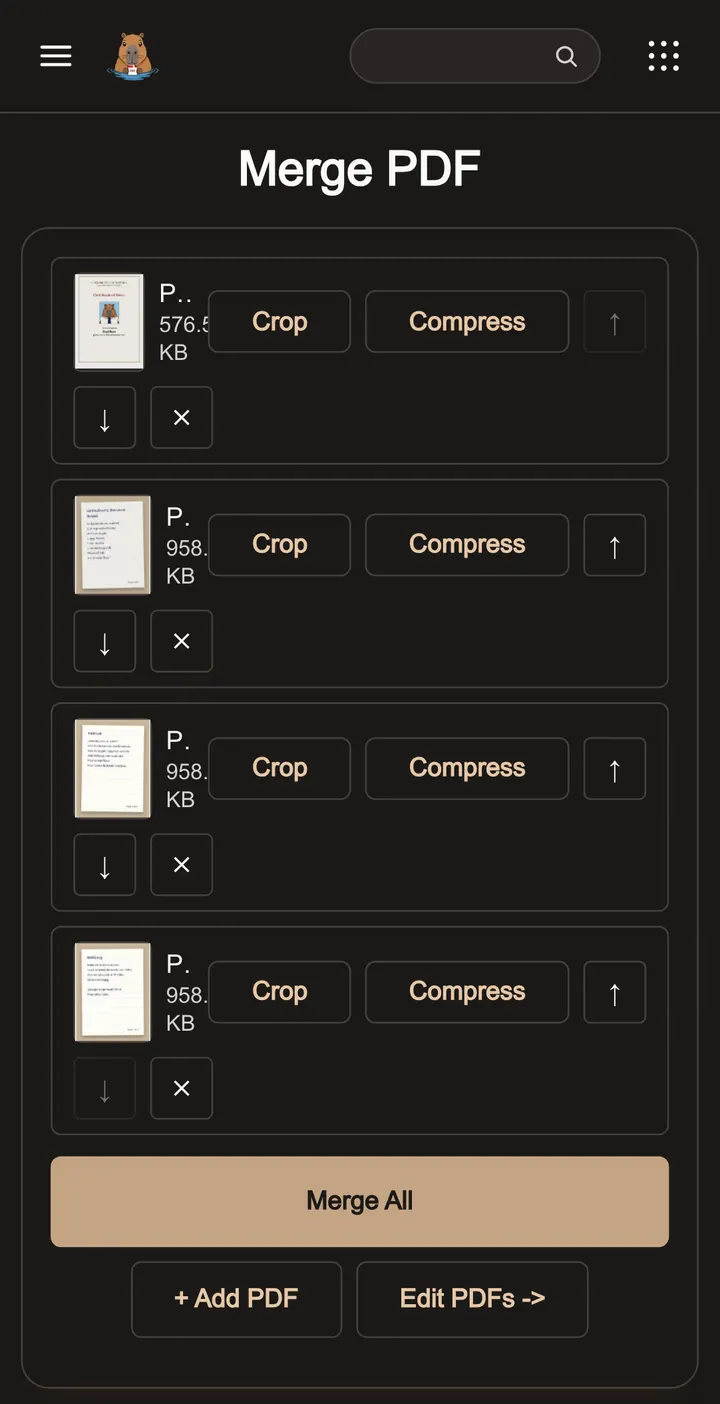
Put merged pages in order
After you add files to Merge PDF, drag the page thumbnails into the order you want before saving one combined PDF.
Open Merge PDF
How the PDF tools work
Pick a PDF
Choose a file from your phone or computer, or bring it in from Google Drive or Dropbox. Scans and phone photos work too.
Make the change
Reorder pages, type on the page, pick a target size or choose an output format. A preview shows each page as you go.
Save the new PDF
The finished file downloads to your device. The original is left as it was, so you can start again if something looks off.
Who uses these PDF tools
Job and exam applications
Upload portals often cap a certificate or resume at 100 KB, 200 KB or 1 MB. Compress PDF has a preset for each, and Merge PDF joins several certificates into the one file a form asks for.
Office paperwork
Sign an agreement, fill in a form someone emailed you, add page numbers to a report or redact a name before you share it, without installing a desktop PDF editor.
Students and teachers
Turn photos of handwritten notes into one PDF, split a long textbook chapter out, or annotate a worksheet and send it back.
Anyone moving between formats
Convert a PDF to Word to edit the text, to JPG for a slide, or the other way round when a site only accepts PDF.
Questions people ask
Are these PDF tools really free?
Yes. Every tool on this page is free to use and to download from, with no watermark and no account. Ads on the site pay for it.
Are my PDFs uploaded to a server?
No. The PDF tools run in your browser, so the file stays on your phone or computer. The only exception is optional server processing for very large files, which runs only if you choose it.
Can I edit the text that is already in a PDF?
You can add text, signatures, shapes and highlights anywhere with the PDF editor. To rewrite existing paragraphs, convert the PDF to Word, edit it there and save it back to PDF.
How do I make a PDF small enough for an upload form?
Open Compress PDF and pick the size the form allows, such as 100 KB, 200 KB or 1 MB. Text stays sharp; photos and scans inside the file are shrunk to fit.
Do the PDF tools work on a phone?
Yes. They work in Chrome and Safari on Android and iPhone, and you can pick a file from your phone's storage, Google Drive or Dropbox.
Can I open a password-protected PDF?
If you know the password, Unlock PDF removes it so the other tools can open the file. To add a password before you send a PDF, use Protect PDF.