
Audio tools
Cut a song down to the chorus, turn a WhatsApp voice note into MP3, make a quiet recording louder or record your voice. Every audio tool on Free-Utils is on this page, and each one processes the sound in your browser.
- Runs in your browser
- Free, no account to download
- Works on phone and computer
All 20 audio tools, grouped by task
Cut, record and adjust audio
Trim and join tracks, make ringtones, change speed and volume, boost bass and treble, reverse a clip or record your voice.
- Compress audioMake an audio file smaller for email or chat.
- Voice recorderRecord your voice with your microphone and save the audio file.
- MP3 cutterCut an audio file down to the part between a start and an end time.
- Ringtone makerPick the best part of a song and save it as an MP3 ringtone.
- Audio joinerJoin several audio files end to end into one MP3.
- Change audio speedSpeed up or slow down an audio file and save it as an MP3.
- Volume boosterMake a quiet audio file louder, or a loud one quieter, and save it as an MP3.
- Reverse audioMake an audio file play backwards and save it as an MP3.
- Bass and treble boosterRaise or lower the bass and the treble of an audio file and save it as an MP3.


Convert audio format
Save sound as MP3, WAV or OGG, or pull the audio out of an MP4, MOV or MKV video.
- Convert audioTurn a recording into MP3, OGG or WAV.
- Video to audioPull the soundtrack from a video and save an MP3.
- MP4 to MP3Keep the sound from an MP4 and save it as an MP3.
- Audio to MP3Turn a recording or video soundtrack into an MP3 so it is small enough to message or email.
- Audio to WAVSave audio as WAV when you want an uncompressed recording.
- Audio to OGGTurn audio into OGG for a smaller file that browsers can play.
- MP3 to OGGTurn an MP3 into an OGG file that browsers and games can play.
- OPUS to MP3Turn a WhatsApp voice note (.opus) into an MP3 that any phone or player can open.
- AMR to MP3Turn an AMR call recording or voice memo into an MP3.
- MOV to MP3Pull the sound from an iPhone or QuickTime MOV and save an MP3.
- MKV to MP3Keep the soundtrack from an MKV and save an MP3 for offline listening or editing.


See the audio tools at work
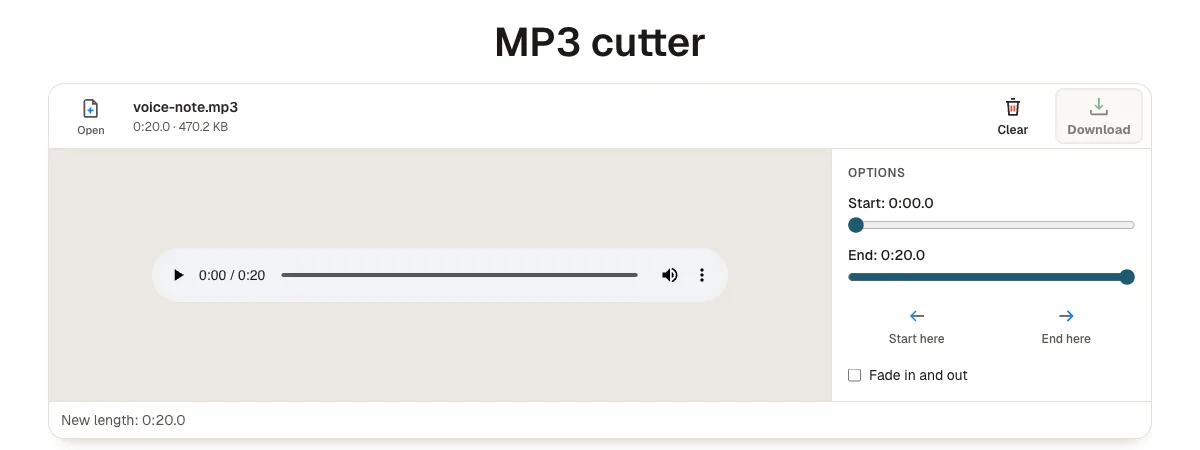
Cut an MP3 to the part you want
MP3 cutter loads the recording with start and end sliders and an optional fade in and out, then saves only that part.
Open MP3 cutter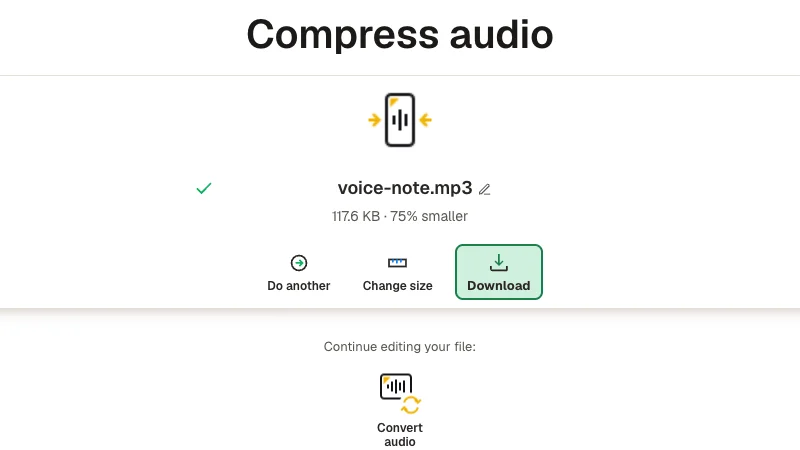
A voice note 75% smaller
A 470 KB recording was saved as a 117.6 KB MP3. Speech stays clear, so voice notes and lectures shrink well.
Open Compress audio
How the audio tools work
Add a recording
Open an MP3, WAV, M4A, OGG, OPUS or AMR file, a video with sound, or record one with Voice recorder.
Shape the sound
Set a start and end, a speed, a volume or a bass level, and press play to hear the change before you save.
Save the audio
Download the new file, usually as an MP3 that any phone, car stereo or editing app can play.
What the audio tools are good for
Ringtones and alerts
Pick the best 30 seconds of a song with Ringtone maker or MP3 cutter, add a fade, and set it as your ringtone.
Voice notes and calls
WhatsApp voice notes (OPUS) and call recordings (AMR) do not open everywhere. Convert them to MP3 so you can keep, share or transcribe them.
Podcasts and lectures
Compress a long recording so it emails, boost a quiet speaker, speed playback up, or join several parts into one file.
Music from videos
Keep the soundtrack from an MP4, MOV or MKV and save it as an MP3 for offline listening.
Questions people ask
Which audio formats can I open?
MP3, WAV, M4A, OGG, OPUS and AMR files, plus the sound from MP4, MOV and MKV videos. Most tools save an MP3.
Is my recording uploaded?
No. The audio is processed in your browser and saved to your device. Nothing is sent to a server.
Will compressing audio make it sound worse?
Speech stays clear even at small sizes, so lectures and voice notes compress well. Music loses some sparkle in the high notes, so keep the original for listening.
How do I make an iPhone ringtone?
Cut the part you want with Ringtone maker and save it. iPhone ringtones must be under 30 seconds and imported through GarageBand or a computer; Android can use the MP3 directly.
Can I record my voice here?
Yes. Voice recorder uses your microphone after you allow it in the browser, and saves the recording to your device.
What is the difference between Convert audio and Compress audio?
Convert audio changes the format, for example WAV to MP3. Compress audio keeps the recording but lowers the bitrate so the file gets smaller.